
How to Integrate Zoho CRM with TeleCMI to Streamline Sales and Customer Support

6 mins read

Posted on Sep 02, 2025

Vignesh N
SEO


Vignesh N
SEO






Recent studies state that workers switch apps and tabs nearly 1,100 times a day, much of that time is lost to repetitive tasks like logging calls and updating records. This constant switching drains productivity and keeps teams away from what truly matters.
But what if every call were automatically logged into your CRM, complete with customer details and follow-up reminders?
With Zoho crm phone integration, this becomes the new standard.
In this blog, we'll explore how this integration combines communication, automates work, and increases the customer experience.

Key Takeaways
 Single source of truth with all call notes and interactions logged within Zoho CRM without manual updates.
- Improved sales cycles with click-to-call and real-time call logging that minimizes precious time.
- Intelligent conversations are fueled by real-time pop-ups and customer history to engage in a more personalized manner.
- Optimize operations and boost performance with real-time call analytics, live feeds, and actionable insights.
- Easy setup within minutes without coding or developer assistance.
What is Zoho CRM?
Zoho CRM is a cloud-based customer relationship management platform that manages all aspects of business interactions, like customers and prospects, which combines sales, marketing, and support efforts.
What is TeleCMI?
TeleCMI is an AI call center software that handles all incoming and outgoing calls from a single platform. With advanced techniques, it simplifies business operations, enhances customer experience, and boosts overall business.
Why Integrate Zoho CRM with TeleCMI?
As we mentioned already, Zoho CRM covers all the customer and prospect information, and TeleCMI focuses on communication management & Zoho WorkDrive ensures secure document storage and seamless team collaboration by centralizing files and enabling real-time access across departments While combining both features and functionality, you can maximize sales and support benefits
- Centralized Communication: Manage all interactions, whether it's sales or support, from multiple channels from a single dashboard.
- Improved Agent Productivity: Save agent time and reduce admin workloads with click-to-call, predictive dialing, consolidated context, auto-summary, and real-time guidance.
- Real-Time Call Tracking and Logging: Every incoming and outgoing call is captured and updated instantly on both platforms.
- Personalized Customer Experiences: Displays customer details in a pop-up, allowing agents to offer a personalized experience in every touchpoint.
- Data-Driven Decision-Making: Track performance, make informed decisions, and optimize operations with real-time analytics and live feeds that transform every raw data point into actionable insights.
Key Features of the Zoho CRM + TeleCMI Integration
In integrating both TeleCMI and Zoho CRM, companies can streamline manual processes, get in-depth insights, and provide personalized interactions.
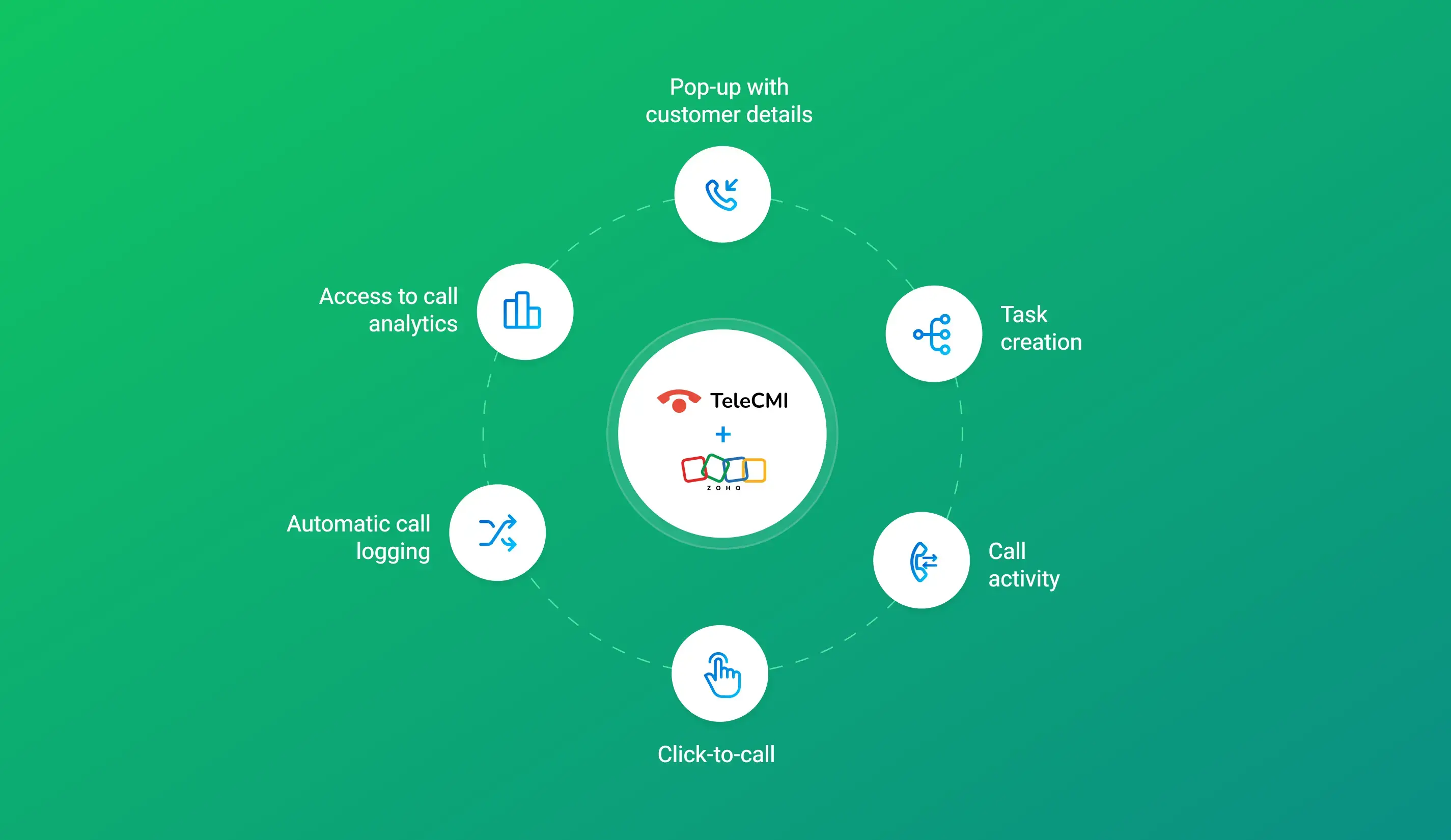
- Click-To-Call From Zoho CRM: Agents can make outbound calls with a single click directly from the customer or prospect profile in CRM without manual dialing.
- Automatic Call Logging: Every inbound and outbound calls are logged to both platforms along with the call record, which reduces manual data entry and ensures detailed call interactions.
- Call Analytics and Insights: Access detailed reports on call volume, duration, missed calls, and agent performance, allowing managers to optimize workflows and make data-driven decisions.
- Real-Time Call Pop-Ups: When a customer calls, a pop-up instantly displays the customer's information, enabling agents to deliver more context-aware and personalized interactions.
- Task Assignment & Follow-Up Reminders: Based on call activity, the system creates tasks automatically, initiates follow-ups, and provides timely reminders.
- Call Activity Tracking: From sales, support, marketing, or operations, all calls are tracked and recorded in Zoho's timeline.

Turn every customer call into a growth opportunity with Zoho CRM and TeleCMI integration.
Start Free TrialBest Practices to Use TeleCMI with Zoho CRM
The following is a checklist of best practices that enhance the workflow, minimize manual efforts, and make overall operations smoother.
- Call Tagging: After each call, make sure to categorize it with a relevant tag like interested, follow-up, escalation, or resolved based on the status.
- Review Calls: Keep an eye on all interactions by regularly tracking and reviewing call volume, missed calls, ideal timing, and resolution rates.
- Set Call Goals and KPIs: Define clear objectives such as average response time, follow-up completion rate, or conversion ratio from calls, allowing teams to stay focused and accountable in any situation.
- Continuous Team Enablement: Train agents continuously on features such as click-to-call, call logging, and follow-up reminders so that they make the most out of the capabilities of the integration.
Use Cases of integrating TeleCMI with Zoho CRM
With the fusion of the capabilities of Zoho CRM and TeleCMI, several advantages become accessible, and we explain how that it benefits various teams.
Sales Team
- Agents can initiate calls directly from the CRM by clicking a button rather than dialing manually.
- Calls are automatically logged in to both systems, reducing manual updates of each interaction.
Support Team
- Agents can instantly access customer profiles, call logs, resolution methods, and up-to-date reports.
- Deliver faster resolutions, reduce repeated explanations, and provide first call resolutions.
Accounts Team
- Automating calls reminding customers about invoices, renewals, and payment follow-ups makes bill collections easier and prevents missed payments.
Marketing Team
- Refine campaigns and optimize KPIs by analyzing call tags, customer feedback, and customer trends.
- Segment audiences in the CRM and send marketing campaigns with personalized messages
How to Integrate Zoho CRM with TeleCMI: Step-by-Step Guide
Before you begin with integration, you must have both Zoho CRM and TeleCMI accounts with the right setup and permissions.
Step 1: Log in to your TeleCMI
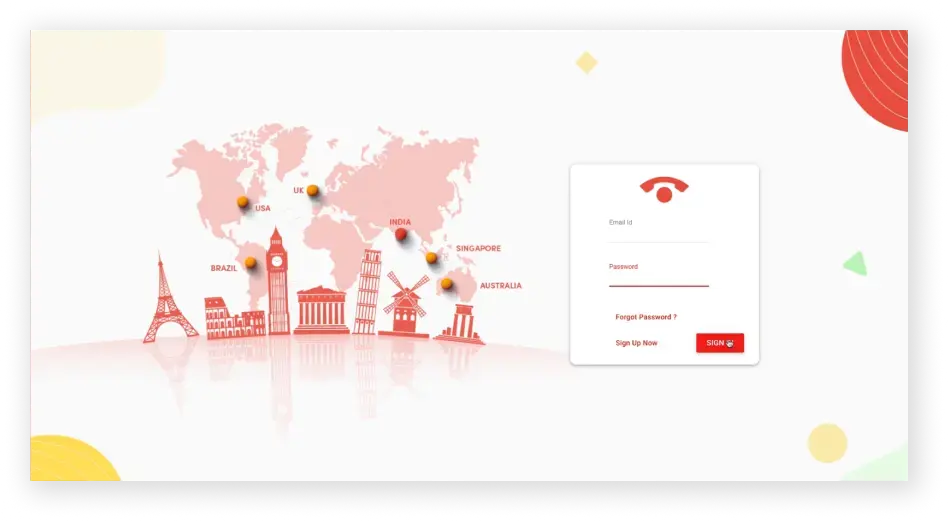
- Sign up or sign in to your TeleCMI control panel with your credentials.
Step 2: Navigate to Integrations > Zoho CRM
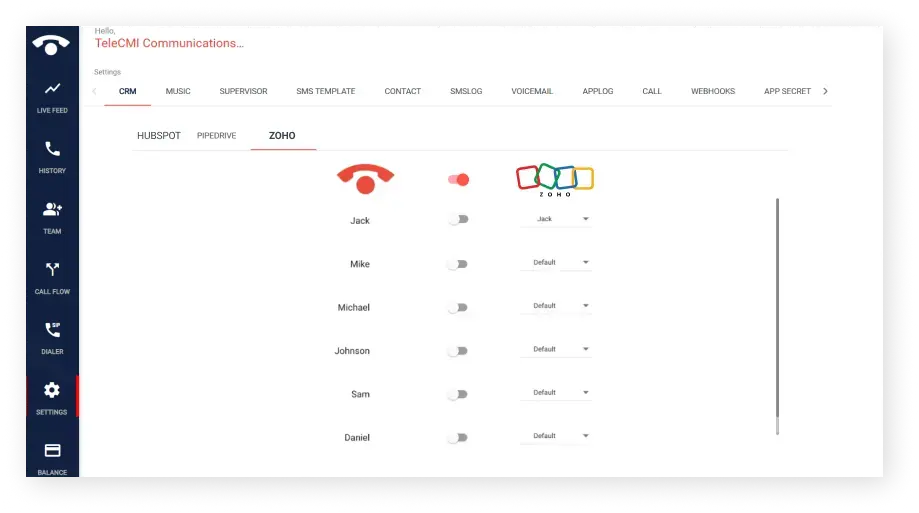
- In TeleCMI, go to Integrations and from the applications list, select Zoho CRM.
Step 3: Authenticate and connect the Zoho CRM account
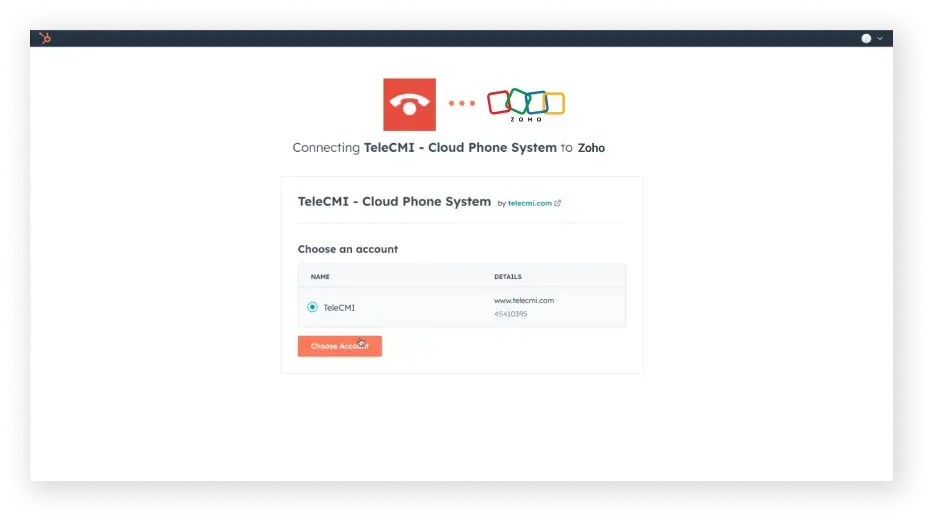
- Sign in with your Zoho credentials and make sure to provide the required permissions to TeleCMI so that both systems can securely sync data.
Step 4: Select a Virtual Number
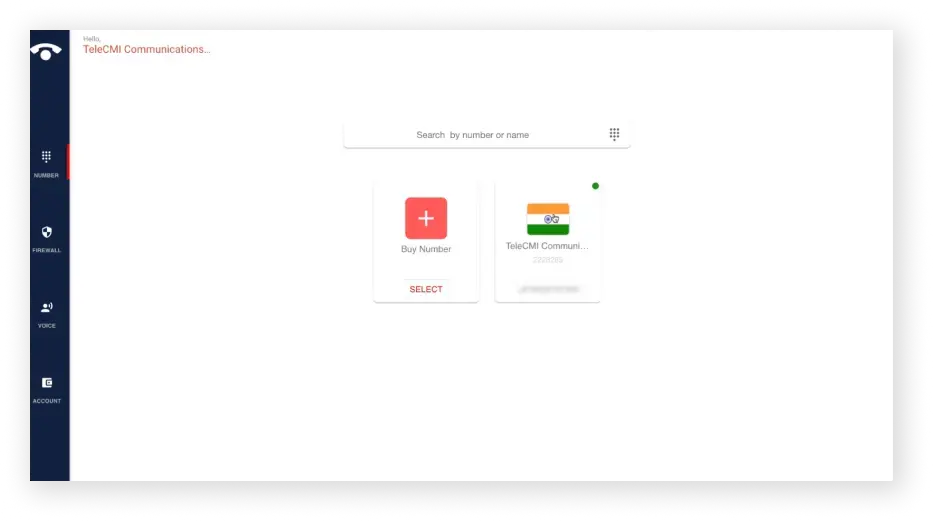
- Choose the virtual phone number in TeleCMI that will log calls into Zoho CRM.
Step 5: Configure User Settings
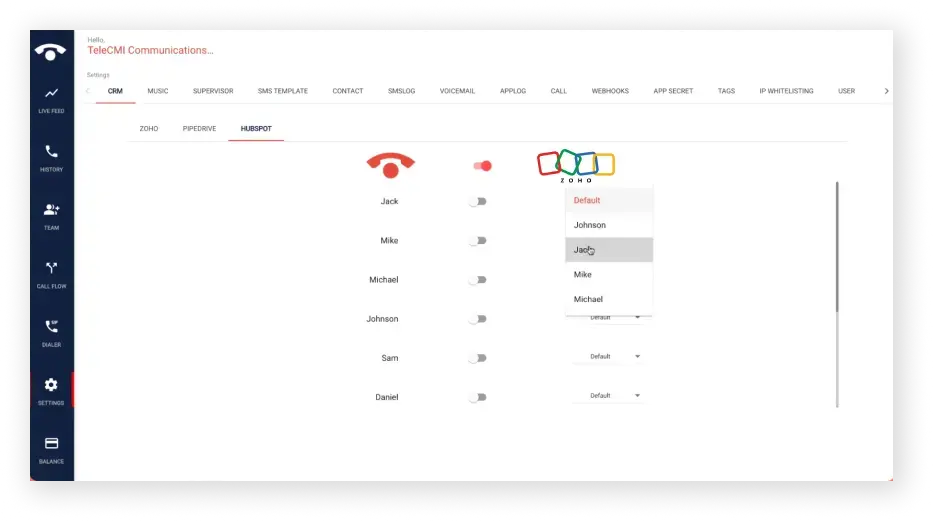
- In TeleCMI, go to User Settings and map each TeleCMI account to the corresponding Zoho CRM user for accurate call tracking.
Step 6: Set Up Webhooks
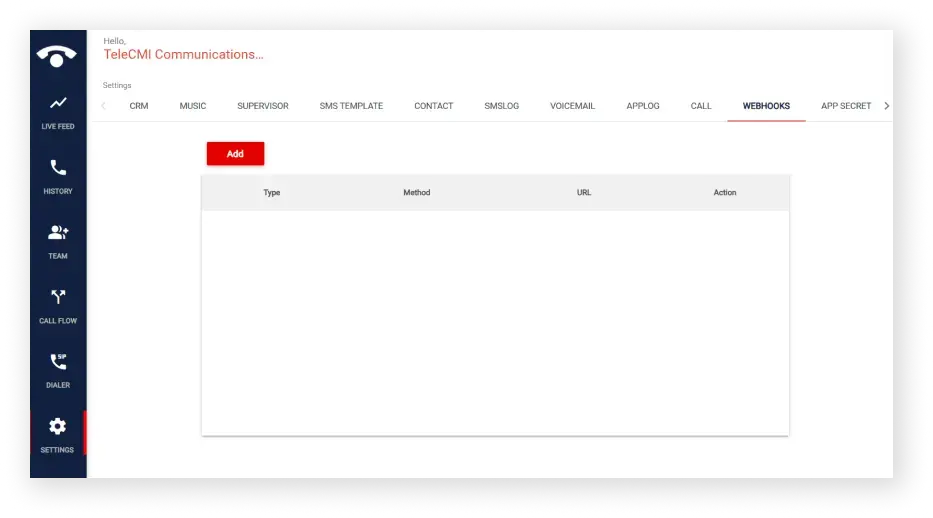
- Enable webhooks in TeleCMI, add a new webhook, and paste the Zoho CRM server URL to sync call details in real time.
Conclusion
Integrating two different platforms, one is TeleCMI and Zoho CRM, is not about syncing two functions; it's about unifying customer interactions, supporting intelligent workflows, and optimizing without limits.
From automating call tagging to offering detailed real-time reports, this integration reduces manual efforts, simplifies the process, and supports context-aware, consistent customer support.
Organizations that support these integrations build stronger relationships and close deals faster.
Experience the power of Zoho CRM with TeleCMI Integration

Click-to-Call from CRM
Faster Resolutions
Improved Sales Conversions
Frequently asked questions (FAQ)
Vignesh N

With deep expertise in cloud telecommunications, I help readers explore the latest trends in VoIP and modern business communication. At TeleCMI, I focus on educating businesses with clear, practical insights, making complex telecom concepts easy to understand. I’m passionate about helping organizations improve efficiency, enhance customer engagement, and adopt smarter communication strategies.


.webp)
.webp)
.webp)



