
Bitrix24 Telephony Integration with TeleCMI: A Practical Guide for Businesses

8 mins read

Posted on Dec 22, 2025

Vignesh N
SEO


Vignesh N
SEO






Phone calls remain central to many sales and support conversations. However, in most companies today, calls are in one system, while customer-related data is in another. This forces the teams to navigate across tools, recall through memory, or make follow-ups after the fact. This results in a long-term gap in follow-through.
Bitrix24 provides structure for customer management, but its value increases significantly when telephony is fully integrated. A CRM that cannot see calls in real time only tells part of the story. Integrating TeleCMI with Bitrix24 closes this gap. Calls are placed, received, recorded, and logged directly inside the CRM, with customer details visible the moment a call comes in.
This blog explores what this integration provides, why this is so important when working with growing teams, and in what way this can be accomplished by a business in a way that will not disrupt their routine.

Key Takeaways
 The phone call is another important customer interaction, but the benefit it provides gets wasted when it is handled outside the CRM system.
- Bitrix24 gets much more useful with the integration of telephonic functions and makes them visible at all times.
- TeleCMI allows TeleCMI to integrate phone calls, the call data, and customer records into one workflow within Bitrix24.
- Automatic call logging, lead generation, and identification enhance efficiency.
- The integration facilitates growing teams by providing scalability, reporting capabilities, and effective communication management.
What Is Bitrix24 & Why Telephony Integration Matters
Bitrix24 is the AI-driven CRM and collaboration platform that gets everything in one place: sales, marketing, and analytics, with an omnichannel experience across teams. Leveraging AI techniques and automation, it allows you to send timely notifications, transcribe phone calls, store files, generate new ideas, and more. Integrating telephony allows businesses to:
- Make and receive phone calls right from the CRM.
- Automatically log calls and notes against contacts and deals.
- Provide click-to-call functionality to reach them all the more quickly.
- Track team performance and call analytics in real time.
What Is TeleCMI?
TeleCMI is a cloud-based telephony and communication solution that helps businesses handle calls, messages, and other communications effectively. It serves as a connecting link between conventional telephony/VoIP solutions and business tools, such as CRM, to combine communication operations into a single process.
Why Integrate Bitrix24 CRM with TeleCMI?
By implementing Bitrix24 CRM Solutions and TeleCMI, it shall be possible to create a platform with the potential to provide an answer in a contextually relevant and informative way with data analysis capabilities. It includes:
- Increased Productivity: Making and receiving phone calls directly from Bitrix24.
- Enhanced Customer Insights: Gain immediate access to details such as the call information, previous records, comments on the agent, consumer satisfaction score, feedback, and CRM records.
- Automated Workflows: Reduce manual data entry with auto-logging and lead generation, synchronized on both platforms.These call insights can also be repurposed beyond CRM workflows, for example, feeding customer conversations into a social media post generator to create relevant, data-backed marketing content.
- Cost-Effective Scaling: Scale and handle growing calls, teams, or branches effortlessly in an effective manner.
- Improved Team Collaboration: Assign calls, track sources, and monitor performance in one place from anywhere with any device.
This CRM integration is particularly valuable for sales and customer support teams, as well as businesses that rely on phone-based interactions.

Key Features of TeleCMI

TeleCMI is designed to make business communications easier without complexity. Its features focus on making less-frequent everyday calls more reliable, traceable, and easier to manage across teams.
- Virtual Business Numbers
Buy virtual, national, and toll-free numbers and use them for multiple sites to route calls across regions and teams.
- Automatic Call Logging
All calls, incoming and outgoing, are logged automatically with information like time, duration, caller details, and any other notes one feels may be relevant without requiring manual input.
- Click-to-Call Functionality
Click-to-call enables users to dial up prospects directly from contact lists or records within the CRM. Eliminate manual dialing, hence fastening the outreach process for elections, sales, and support groups that have to handle high call volumes.
- Caller Identification with Screen Pop-ups
When a customer calls, their information pops up on-screen before an agent answers the call. Agents know who calls them, what the last interaction was, and where the conversation left off. This context creates conversations that are a lot calmer and more focused.
- Automatic Lead Creation for Unknown Numbers
Calls from unknown numbers always create new leads in the Bitrix24 system with the call information to not miss any opportunity.
- Call Recording and Storage
TeleCMI supports recording and retaining calls in a secure manner. Recordings are useful for training, quality monitoring, dispute resolution, and also for internal compliance requirements.
- IVR and Smart Call Routing
It enables callers to reach their desired departments or agents with the help of Interactive Voice Response and routing rules, without any delay. Calls can be distributed by availability, within working hours, or according to predefined priorities.
- Analytics and Call Reports
TeleCMI provides transparent call reports and insights on overall performance. Managers can assess call volume, response time, and agent activity to identify communications trends that can be used to develop team efficiency.
- CRM Integration Support
TeleCMI integrates with CRM platforms such as Bitrix24, allowing call data and recordings to be linked directly to leads, contacts, and deals. This keeps communication aligned with sales and support workflows.
- Scalable for Growing Teams
As businesses grow, TeleCMI grows along with you. Regardless of the users, figures, and functionalities, TeleCMI’s scalability will adapt to you.
Step-by-Step Guide to TeleCMI Integration with Bitrix24 CRM
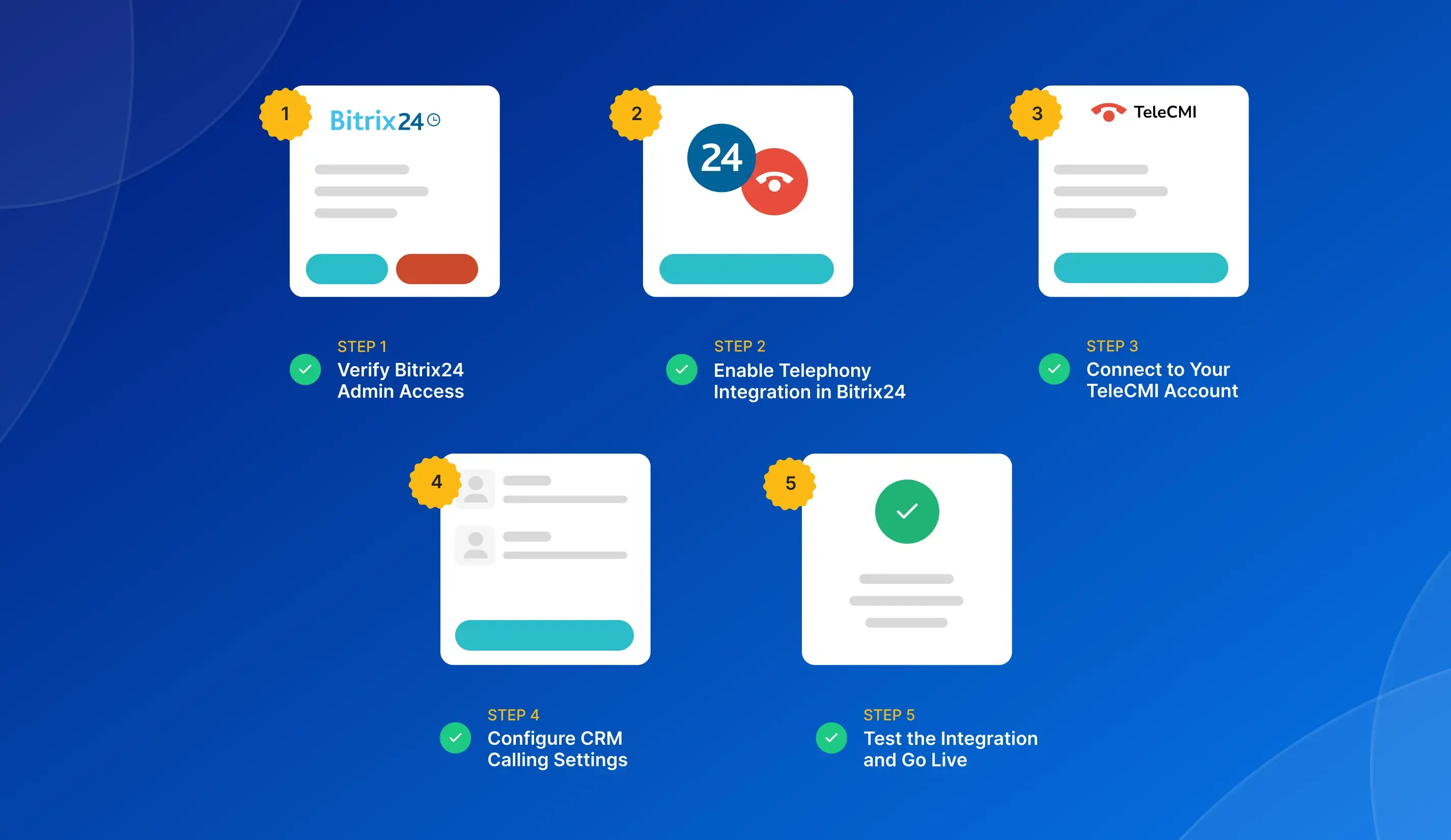
TeleCMI integration with Bitrix24 CRM ensures simplicity and effectiveness. To enable calls in Bitrix24 and manage all business calls in this service, you should do the following:
Step 1: Verify Bitrix24 Admin Access
Log in to your Bitrix24 CRM with admin credentials to set up the integration and ensure Leads, Contacts, and Deals modules are enabled for mapping.
Step 2: Enable Telephony Integration in Bitrix24
Go to either Bitrix24 Telephony or Integrations and turn on the TeleCMI telephony integrations to begin integration.
Step 3: Connect to Your TeleCMI Account
Verify the TeleCMI account credentials or the API to link the account to Bitrix24.
Step 4: Configure CRM Calling Settings
Map calls to the appropriate CRM records, enable automatic call logging, and activate call recording synchronization if required.
Step 5: Test the Integration and Go Live
Test both the system to ensure that click-to-call is working, calls are logging, and the caller ID displays correctly. Once you confirm that everything works launch and train your team.
Conclusion
When telephony and CRM systems operate in isolation, teams lose visibility and momentum. Calls go untracked, context is missed, and valuable customer interactions remain fragmented. Integrating TeleCMI with Bitrix24 means voice communication directly within the CRM environment.
With this integration, organizations have gained better visibility into every conversation, from the first incoming call to the post-sales follow-ups. Sales and support teams can work more quickly, respond with better context, and rely on accurate call data without extra manual efforts. All the reporting and control of the conversation process, including the flows, are controlled by the managers.
With expanding organizations, the demand for more organized forms of communication also increases. This integration between Bitrix24 and TeleCMI provides the ideal platform where communication and information about the customer can be efficiently combined. Discover how integrating TeleCMI with Bitrix24 CRM helps teams track calls, capture leads, and maintain consistent communication records.
Experience the Power of Bitrix24 CRM + TeleCMI Integration

Instant Integration
Click-to-Call from CRM
Real-Time Insights
Improved Sales Conversions
Frequently asked questions (FAQ)
Vignesh N

With deep expertise in cloud telecommunications, I help readers explore the latest trends in VoIP and modern business communication. At TeleCMI, I focus on educating businesses with clear, practical insights, making complex telecom concepts easy to understand. I’m passionate about helping organizations improve efficiency, enhance customer engagement, and adopt smarter communication strategies.


.webp)
.webp)



