How to Migrate From On-Premise PBX to Cloud Without Any Downtime

14 mins read

Posted on Jun 05, 2026

Saravana Kumar
SEO


Saravana Kumar
SEO






For telecom architects, the challenge of modernizing the telephonic system is not just about moving virtual machines or changing protocols; it's about continuity. Imagine it's 9.00 AM on a Monday, your sales calls aren't going properly, support tickets are piling up, and every minute of silence costs your business money and reputation. This concern has historically caused organizations to postpone phone system upgrades for years.
Fortunately, a zero-downtime migration process has been made possible by cloud providers offering services of cloud PBX in 2026. Cloud PBX system has come up with various ways through which the migration can take place without the disruption of work processes. This article offers comprehensive insights into how to migrate from a conventional PBX to the cloud PBX.

Key Takeaways
Zero-downtime PBX migration is achievable only if you do proper planning and operate two PBXs together during the migration process.
It is essential to evaluate your existing phone numbers, IVR menu, hardware equipment, and integration services before the migration.
Select a cloud PBX vendor that has number porting capabilities, proven migration skills, and consistent availability.
Don’t do a complete migration of your entire business in one go; do departmental migrations.
Keep monitoring the performance of the system even after migration to ensure that everything runs smoothly.
Why Businesses Are Moving Away From On-Premise PBX in 2026
PBX system migration to the cloud is now no longer optional but mandatory. There are several reasons why companies cannot continue using the traditional PBX system.
Rising Hardware Maintenance Costs
On-site PBX equipment needs regular maintenance, some upgrading, and access to qualified staff. With each passing year, obtaining replacement parts for old PBXs becomes increasingly challenging, expensive, and problematic. What was once a one-time CAPEX investment slowly evolves into variable OPEX.
Remote and Hybrid Work Has Made Desk Phones Obsolete
For a workforce that works from the office, home offices, co-working hubs, and even different locations, it’s impossible to rely on the traditional on-premises PBX phone system. The users need to have their phones available for work purposes through their laptops or mobile devices.
Scaling Up Is Extremely Tedious
The scaling-up process with a traditional PBX can be very tedious for several reasons, including purchasing the necessary equipment, scheduling engineer visits, and downtime. With cloud PBX, you can immediately increase capacity via the internet portal.
Vendor End-of-Life Notices Are Forcing Action
The companies that developed PBXs have begun or are about to issue end-of-life notifications for existing on-premises phones. The issue arises after the end of the life cycle, when the product ceases to be upgraded with any new security patches or software updates.
What Is a Cloud PBX and What Changes After Migration?
A cloud PBX system is a telephone system that uses the cloud rather than hardware on-site. All calls made from such a system travel via the internet, and the PBX system can be managed via a browser or application-based management portal.
But for customers, there won’t be any differences. They continue calling the same numbers and experience the same call flow. The biggest improvements happen behind the scenes, where your business gains more flexibility, lower costs, and easier system management.
Things to Audit First Before Migration
Document Your Current IVR Menu Structure
Document your current IVR menu design, along with greetings, options, and call flow paths. If you don’t have any documentation, test by calling into your company and creating a detailed document yourself.
List All Hardware Devices
Create a list of hardware devices connected to your on-premises PBX system. This includes phones for your receptionist, conference call phones, desk phones, reception console, and fax lines.
Check Internet Bandwidth
Cloud-based PBX requires a fast and reliable internet connection. Conduct an evaluation of your internet speed and connectivity before migration to ensure sufficient bandwidth.
Identify Business-Critical Call Flows
Identify critical business call flows, including your sales, support, and general reception numbers, and route them through your system properly. This will make sure you test these flows thoroughly and migrate them once you’re confident about them.
Map Out Existing Integrations
Make a list of software applications integrated with your current PBX system. Check with your cloud PBX provider if these applications are compatible with their system before the migration begins.
Selecting the Correct Cloud PBX Service for Migration
Not all cloud PBX services can migrate you effectively from an on-premises setup. Consider migration capability when selecting a cloud PBX provider, not just as an afterthought.
Here are important aspects to consider:
Number Porting Support
- Make sure that the provider will be able to port from your existing service provider.
- Find out what sort of experience they have with complicated number porting.
- Learn more about the usual time required and risks involved with number porting.
- Ask about the way they ensure uninterrupted service during the porting procedure.
Parallel Running Capability
- Find out whether the provider will allow your current PBX and cloud system to work simultaneously.
- Use the overlap period to test configurations and user workflows.
- Test your call routing, extensions, voicemail, etc.
- Don't choose the provider requiring a quick transition.
Dedicated Migration Assistance
- Determine if a dedicated migration expert or team will be assigned to the job.
- Check the extent of support that will be available while moving and deploying.
- Find out the procedures for the escalation of critical issues.
- Determine if migration support will continue beyond the initial go-live phase.
CRM and Business Application Integrations
- Verify compatibility with platforms such as Salesforce, HubSpot, and Zendesk.
- Native integration should always be preferred over third-party hacks.
- Check if click-to-call, logging calls, and synchronization of customer information is supported.
- Review any additional licensing or implementation requirements.
Uptime and Service Level Agreements (SLAs)
- Products offering 99.99% uptime would be preferable, particularly in an enterprise setting.
- Know how the uptime will be measured and reported.
- Learn about the process for addressing SLA breaches.
- Understand the remediation or compensation process for SLA violations.
Selecting a proper provider of cloud PBX services involves much more than comparing price tags and looking for the best set of features. Migration, implementation support, integration with other solutions, and availability requirements will matter just as much for the success of the transition and its smoothness.
Looking for a cloud PBX provider that handles the migration for you?
Dedicated migration assistance. Number porting support. Rapid deployment
The Step-by-Step Zero-Downtime Migration Plan
Follow these six steps in order, and your phones will never go silent. This is the cloud PBX migration guide that IT teams and operations managers actually use.
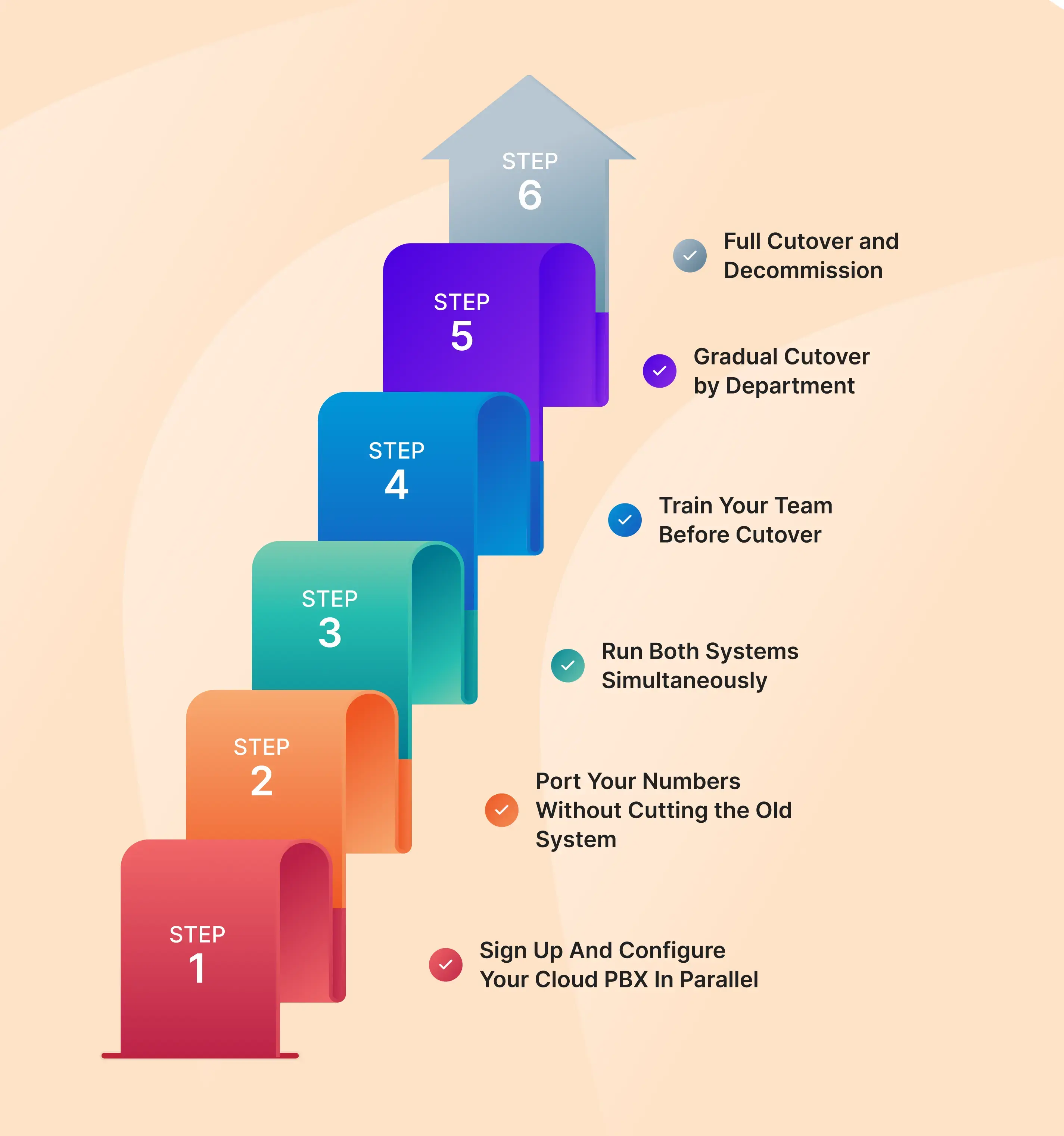
Step 1: Sign Up and Configure Your Cloud PBX in Parallel
Configure your cloud PBX ahead of making any modifications to your current setup. You need to configure extensions, IVRs, call routing, and ring groups. Make sure everything works correctly on the internal level.
Step 2: Port Your Numbers Without Cutting the Old System
Initiate phone number porting while continuing using the current system as usual. Given that phone number porting usually takes several business days, your existing on-premise PBX will remain in service during the whole process.
Step 3: Run Both Systems Simultaneously
Operate both systems at once for a short while. Use a few calls through the cloud-based PBX system and check how everything works before switching more calls.
Step 4: Train Your Team Before Cutover
Provide training to the employees on the new software phone, mobile app, and dashboard while you still have the old one in use.
Step 5: Gradual Cutover by Department
Move one department at a time, starting with teams that handle fewer calls. Verify everything works properly before migrating the next group.
Step 6: Full Cutover and Decommission
Once the cloud PBX has been running smoothly for a few days, move all remaining users to the new system. You can then retire the old PBX hardware and cancel any related maintenance contracts.
Number Porting - How to Keep Your Existing Numbers
Number porting is the process of transferring your existing business phone numbers from your current carrier to your new cloud PBX provider. It is one of the most important parts of any PBX migration to the cloud and one of the most frequently misunderstood.
What Documents Are Needed
- Letter of Authorization (LOA) - a signed document authorizing the port request
- Your current account number with the losing carrier
- A recent bill from your current provider showing the numbers to be ported
- The billing address associated with the account
How Long Does Porting Take?
- Local geographic numbers: typically 3 to 7 business days
- Toll-free numbers: 5 to 10 business days
- Complex or multi-number ports may require additional verification and take longer
What Happens to Calls During the Porting Window?
During the porting window, your numbers remain active on the old system. Callers can still reach you through your existing numbers without any disruption. The number only moves to the new carrier at the point of port completion — known as the “firm order commit” date.
Using Call Forwarding as a Safety Net
As an extra precaution, set up call forwarding from your old system to the new cloud PBX numbers for the 24 hours surrounding the port completion date. This ensures that even if the port completes slightly ahead of or behind schedule, no call is missed.

For a detailed walkthrough of the porting process, the FCC Number Portability Guide (fcc.gov) provides authoritative guidance on your rights and the process involved when switching providers.
The 5 Most Common Migration Mistakes and How to Avoid Them
Even well-resourced IT teams make avoidable mistakes during a cloud PBX migration. Here are the five most common pitfalls and how to sidestep each one.
1. Cutting the Old System Before Porting Is Confirmed Complete
This is the number one cause of migration downtime. Businesses eager to be done with their old hardware switch it off before the port is fully confirmed, only to discover that one or more numbers did not complete the transfer. Never decommission the on-premise PBX until you have confirmed every number is live and routing correctly on the new system.
2. Not Testing Internet Bandwidth Before Migration
Cloud PBX performance is directly tied to your internet connection quality. Businesses that skip the bandwidth test often discover call quality issues only after going live. Run a proper bandwidth and latency test under peak usage conditions — not just a quick speed check on a quiet afternoon.
3. Skipping the Parallel Running Period to Save Time
The parallel run seems to be nothing but a hindrance when you're excited to move on from the old equipment. Don’t fall into that trap. Running the two systems side by side for 48 to 72 hours will provide you with a safety net to catch any routing problems, audio problems, and integration problems before they happen to your customers.
4. Migrating All Departments at Once Instead of in Phases
A whole-company cutover on day one is high risk with no upside. If an issue emerges, it affects your entire business simultaneously. A phased, department-by-department migration limits the blast radius of any problem and gives your team time to build confidence in the new system before it handles your highest-value call traffic.
5. Not Documenting the Existing Call Flow Before Starting
Many businesses discover mid-migration that nobody actually knows how the current IVR is configured - it was set up years ago by someone who has since left, and the documentation no longer exists. Rebuilding an undocumented call flow from memory under time pressure is a recipe for mistakes. Complete your audit before you start.
What Happens After Migration - Your First 30 Days
Going live on your new cloud PBX is not the finish line; it is the starting line. The first 30 days after migration are critical for stabilizing performance, training any remaining staff, and extracting the full value from your new platform.
Monitor Call Quality and Resolve Initial Issues
Migration of your cloud PBX system isn't the end – it's the beginning. You'll need the initial thirty days after migration to stabilize the performance of your system and train all the personnel who haven't yet gotten the hang of using their system.
Use Analytics to Measure Performance
Analyze the reports generated from the call data and compare them with performance prior to migration. Consider the number of missed calls, average waiting time, and other similar parameters in order to gauge the performance of the new system.
Onboard Remaining Staff
Each member of the team must be able to operate the new PBX system. For those members of the team who have not yet gone through the onboarding process, training to use the new telephone system must be provided.
Decommission Hardware and Cancel Old Contracts
Once the cloud PBX is running smoothly, retire your old PBX hardware and cancel any unnecessary maintenance or carrier contracts. This helps reduce costs and completes the migration process.
The TeleCMI post-migration support team stands ready to assist you during your first 30 days after migration. They are able to answer your configuration queries and assist with routing optimization to get the most out of the system.
Conclusion
Migrating from an on-premise PBX system to the cloud without any downtime whatsoever can actually be achieved when one plans effectively, runs both systems concurrently, and rolls out the migration gradually by department. The businesses that experience disruption during a PBX migration to the cloud are almost always those that rush the process or skip the preparation steps outlined in this guide.
With the right cloud PBX service and a systematic migration from on-premise PBX to cloud in hand, you can put away your old hardware, reduce costs associated with hardware upkeep, and have a great phone system for your team, all while not missing a beat in your phone service.
Migrate without a single missed call
TeleCMI offers dedicated migration support, number porting, and 99.99% uptime
Frequently asked questions (FAQ)
Saravana Kumar

I’m passionate about exploring and sharing insights on modern cloud communication technologies. At TeleCMI, I focus on helping readers understand the evolving world of cloud telephony and IVR solutions in a simple yet in-depth way. My goal is to deliver genuine value by turning complex telecom concepts into clear, actionable knowledge that builds trust and drives innovation.