HubSpot CRM + TeleCMI: One-Click Cloud Telephony Integration

6 mins read

Posted on Nov 15, 2024

Vignesh N
SEO


Vignesh N
SEO






Across the globe, businesses face challenges in overcoming improper communication systems, disorganized customer data, and missed sales opportunities. To tackle such challenges and achieve their goals, they must integrate cloud telephony with Hubspot CRM.
Businesses can streamline workflows with deeper insights into customer interactions and swiftly improve response times by integrating telephony systems with CRM. Let’s explore why integrating a cloud telephony system with Hubspot CRM will benefit businesses in multiple ways.

Key Takeaways
 HubSpot CRM and TeleCMI integration creates a unified workspace, allowing teams to manage calls, contacts, and customer interactions from one platform.
- The integration enhances both sales and support workflows by automating call logging, syncing customer data, and reducing manual work for agents.
- Businesses gain stronger visibility into customer communication with synced call history, recordings, notes, and activity tracking directly in HubSpot.
- Teams can work more efficiently through click-to-call, caller insights, and automated data entry, improving speed, accuracy, and productivity.
- The integration improves customer experience by delivering contextual, personalized conversations, supported by real-time CRM data during every call.
What is Cloud Telephony Integration?
The primary work of a cloud telephony integration is to connect business phone system with a CRM like HubSpot, allowing them to manage calls, log customer interactions, and access analytics within a single platform.
Communication is managed through a single channel, and one can make, receive, and record calls directly in HubSpot.
The integration also creates a streamlined workflow that has accessible and updated data always.
Features of cloud telephony integration with HubSpot CRM
Cloud telephony integration with HubSpot CRM provides a comprehensive list of features designed to improve communication processes. Below are the significant features that make this integration essential for transforming businesses and their approach towards customer engagement.
- Click-to-call Functionality
- Call Logging
- Call Recording and Playback
- Real-time Notifications & Alerts
- Detailed Analytics
- Agent Mapping
- Call Disposition
Step-by-Step Guide to Integrate HubSpot CRM with TeleCMI
Step 1: Log in to TeleCMI
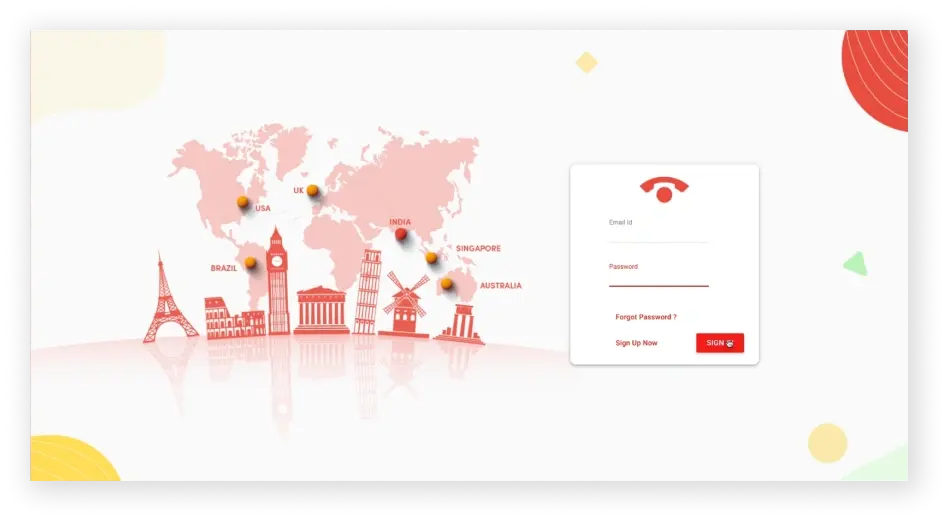
Log in to your TeleCMI business account to access the settings required for integration.
Step 2: Enable HubSpot Integration
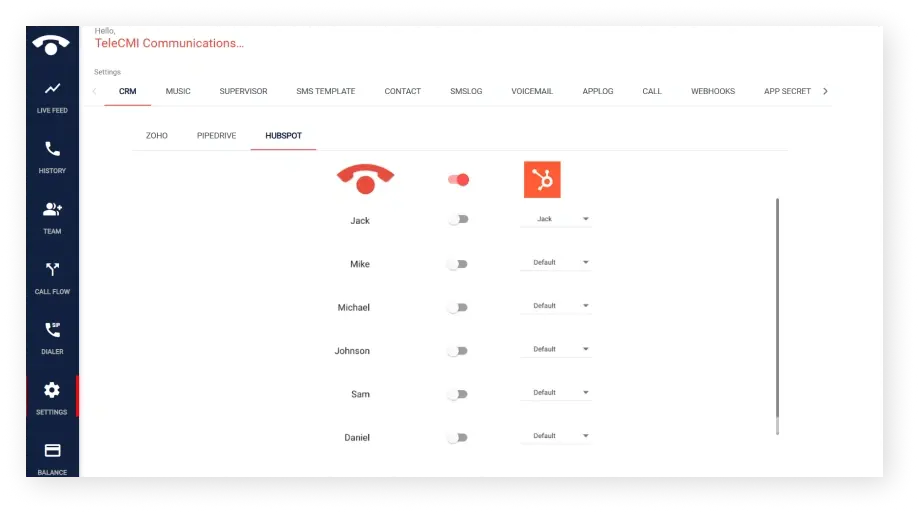
- Select Integration - Choose HubSpot from the list of integration options within TeleCMI
- Activate the Integration - Toggle the switch to enable HubSpot integration, linking your accounts for data sharing.
Step 3: Authenticate with HubSpot
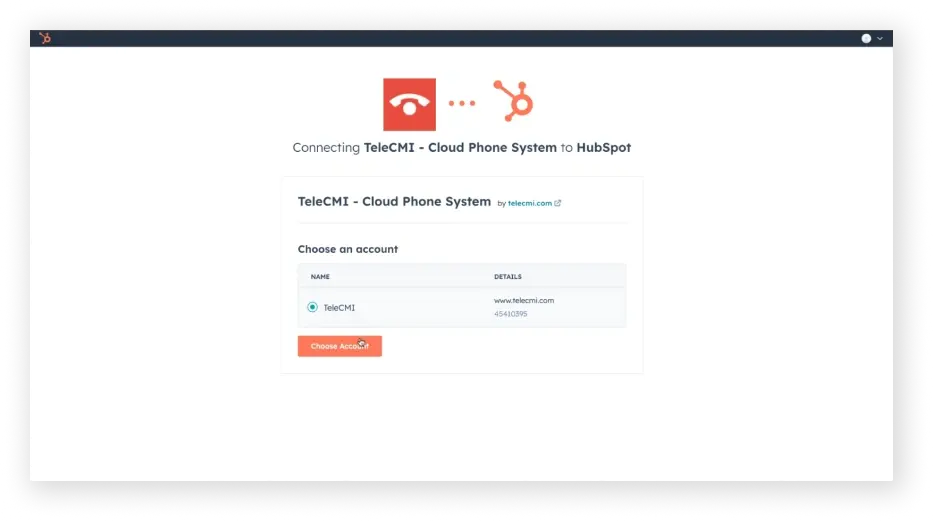
- Redirect to HubSpot - You will be redirected to HubSpot after enabling the integration.
- Choose HubSpot Account - Select the specific HubSpot account you prefer to connect with TeleCMI, allowing the two platforms to communicate.
Step 4: Select a Virtual Number
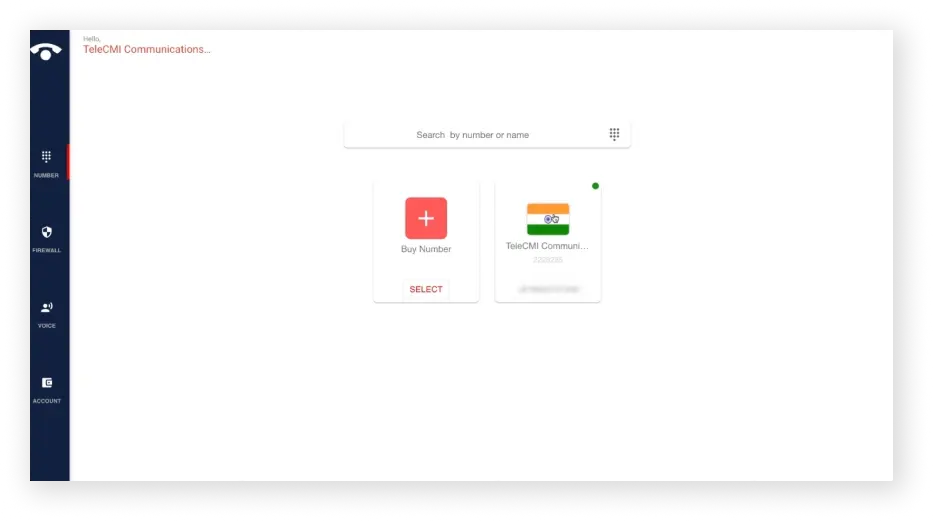
- Go back to your TeleCMI settings and choose the virtual phone number you wish to use for the HubSpot integration.
- This number will be the primary contact point for logging calls within HubSpot.
Step 5: Configure User Settings
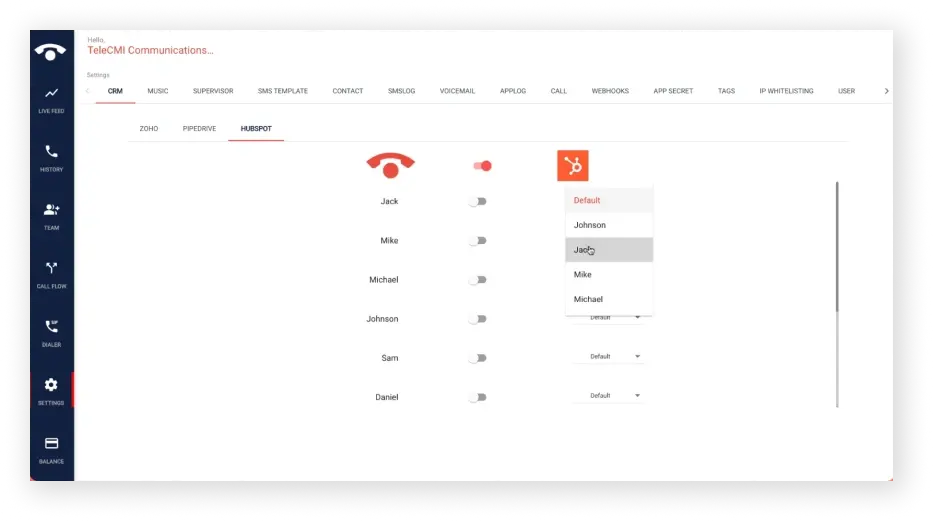
- Access Settings - Within TeleCMI, navigate to user settings and assign the account name corresponding to your HubSpot account. This ensures that call data aligns accurately with the right user profiles in HubSpot.
Step 6: Set Up Webhooks
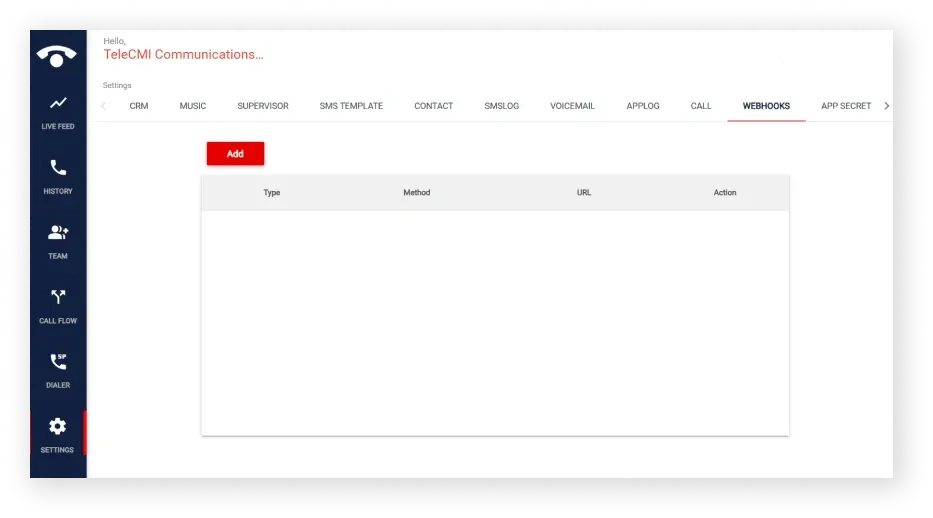
- Activate Webhooks: Turn on webhooks in the TeleCMI interface, then click “Add” to set up a new webhook.
- Configure Webhook Details: Choose the desired webhook type and notification preferences, then paste the provided URL in the “Server URL” field. This enables real-time updates and ensures call details flow into HubSpot’s activity log.
These steps will set up your HubSpot and TeleCMI integration, with call details in HubSpot’s activity tab.

Also Read: Explore how Zoho CRM telephony integration offers similar telephony efficiency for growing teams.
What are the benefits of integrating TeleCMI with Hubspot CRM?
- Centralized Call Management: By integrating TeleCMI with HubSpot, the call and CRM data gets unified into a single platform, enabling real-time access to customer records, call activities, and insights across departments. The data flow gets centralized between two systems, thereby allowing agents a holistic view of customer interactions, reducing the need to switch between platforms, and enhancing productivity in customer relationship management.
- Automated Call Logging & Tracking: Every incoming or outgoing call is automatically logged in the CRM with call details. This functionality eliminates the manual entry of such information, allowing agents to choose between priority tasks. TeleCMI’s automation streamlines call tracking , which helps managers monitor interactions without further effort.
- Improved Customer Insights: TeleCMI delivers advanced analytics, including call pattern analysis and customer behavior tracking within HubSpot CRM. Businesses can leverage this data to identify engagement trends and customer preferences and align communication strategies. Teams can also make data-driven decisions, redefining their approach to customer engagement and improving their lead-to-customer conversion rates.
- Enhanced Agent Productivity: With click-to-call and integrated call logging, TeleCMI’s HubSpot integration assists in reducing repetitive tasks and manual dialing errors, enhancing overall agent efficiency. The click-to-call functionality drives quicker call initiation from HubSpot, while automated logging reduces distractions, allowing agents to deliver more impactful customer interactions. TeleCMI’s routing capabilities can direct calls to the most suitable agents, enhancing their productivity.
- Better Customer Experience: With all the past customer conversation histories, previous call logs, emails, and CRM notes, agents can deliver personalized service to their customers. TeleCMI’s integration with HubSpot CRM supports consistent, quality interactions across customer touchpoints, building trust and establishing a brand reputation for service excellence.
Key Facts
Telephony + CRM integration can eliminate about 30 minutes of manual work per agent daily
To Wrap Up
For businesses aiming to enhance communication efficiency and customer engagement, integrating TeleCMI’s cloud telephony with HubSpot CRM offers a strategic advantage to strengthen their market positioning. As a trusted cloud communication platform by over 2500+ businesses for teams and customer communications, TeleCMI’s integration with HubSpot opens a world of new user capabilities.
This strategic partnership creates a powerful platform for businesses aiming to deliver top-notch customer experiences, manage sales, support calls, and drive global growth.
Experience the Power of HubSpot CRM + TeleCMI Integration

One-Click Calling
360° Customer View
AI Automation
Frequently asked questions (FAQ)
Vignesh N

With deep expertise in cloud telecommunications, I help readers explore the latest trends in VoIP and modern business communication. At TeleCMI, I focus on educating businesses with clear, practical insights, making complex telecom concepts easy to understand. I’m passionate about helping organizations improve efficiency, enhance customer engagement, and adopt smarter communication strategies.