
Top CRM Software with TeleCMI Pre-Built Integrations (2026 Guide)

16 mins read

Posted on Aug 13, 2026
.webp)

Vignesh N
SEO


Vignesh N
SEO






Sales and support teams juggle two systems every single day. The phone system tracks the calls. The CRM tracks the customer. When these two live apart, agents end up doing the connecting work by hand, typing call notes, updating contact fields, setting reminders for follow-ups that a system could set on its own.
A pre-built TeleCMI CRM integration closes that gap. Call data, recordings, contact history, and outcomes automatically transfer between TeleCMI and the CRM. No manual entry. No third-party connector holding the pieces together.
This guide gives you a complete walkthrough of CRM platforms with native TeleCMI integrations, what each platform provides for sales and support teams, and how to pick the right fit based on team size, industry, and the level of automation the workflow requires.

Key Takeaways
 TeleCMI CRM integrations connect the calling activity straight to customer records, so sales and support teams spend less time on data entry and more time on conversations.
- Click-to-call, automatic call logging, screen pop, call recordings, and workflow automation are the features doing most of the heavy lifting.
- Zoho CRM, HubSpot, Salesforce, LeadSquared, and Freshdesk each bring something different to the table depending on team size and industry.
- The right choice comes down to existing software ecosystem, team size, and how much automation the sales or support motion actually calls for.
Importance of CRM and Phone System Integration
An agent hangs up, and the busywork begins: hunting down the right contact record, typing out notes, logging what happened, and setting a reminder to follow up. It takes five minutes—maybe more. Multiply that across twenty calls a day, and an agent loses almost two hours just updating records.
HubSpot’s research points directly to the fix: when your phone system and CRM talk to each other, agent-facing details pop up the second a call connects, and every detail—including transcripts and recordings—logs itself automatically afterward.
The changes once the connection is in place:
- Instant context: The contact record pops up before your agent even says hello.
- Zero-effort logging: Calls log themselves the moment they wrap up—no typing required.
- Automatic archives: Recordings are saved directly to the account, ready for next steps like coaching or quality reviews.
- Automated next steps: Follow-up tasks generate based on call disposition tags, not whether someone remembers to set a reminder at 5 PM on a Friday.
The payoff goes beyond saved time—it shifts manager-level visibility. Instead of piecing together what happened from end-of-day agent reports, managers can watch live calling activity directly drive deal progression.
TeleCMI delivers this connected workflow across 120-plus native integrations—covering CRMs, helpdesks, and marketing tools. Whatever stack your team relies on, TeleCMI fits right in.
What a Pre-Built TeleCMI CRM Integration Actually Does
“Pre-built” means TeleCMI develops and maintains the connector directly. It is not a Zapier-style workflow stitched together after the fact, which tends to introduce lag and the occasional dropped sync. A native integration behaves like part of the CRM itself.
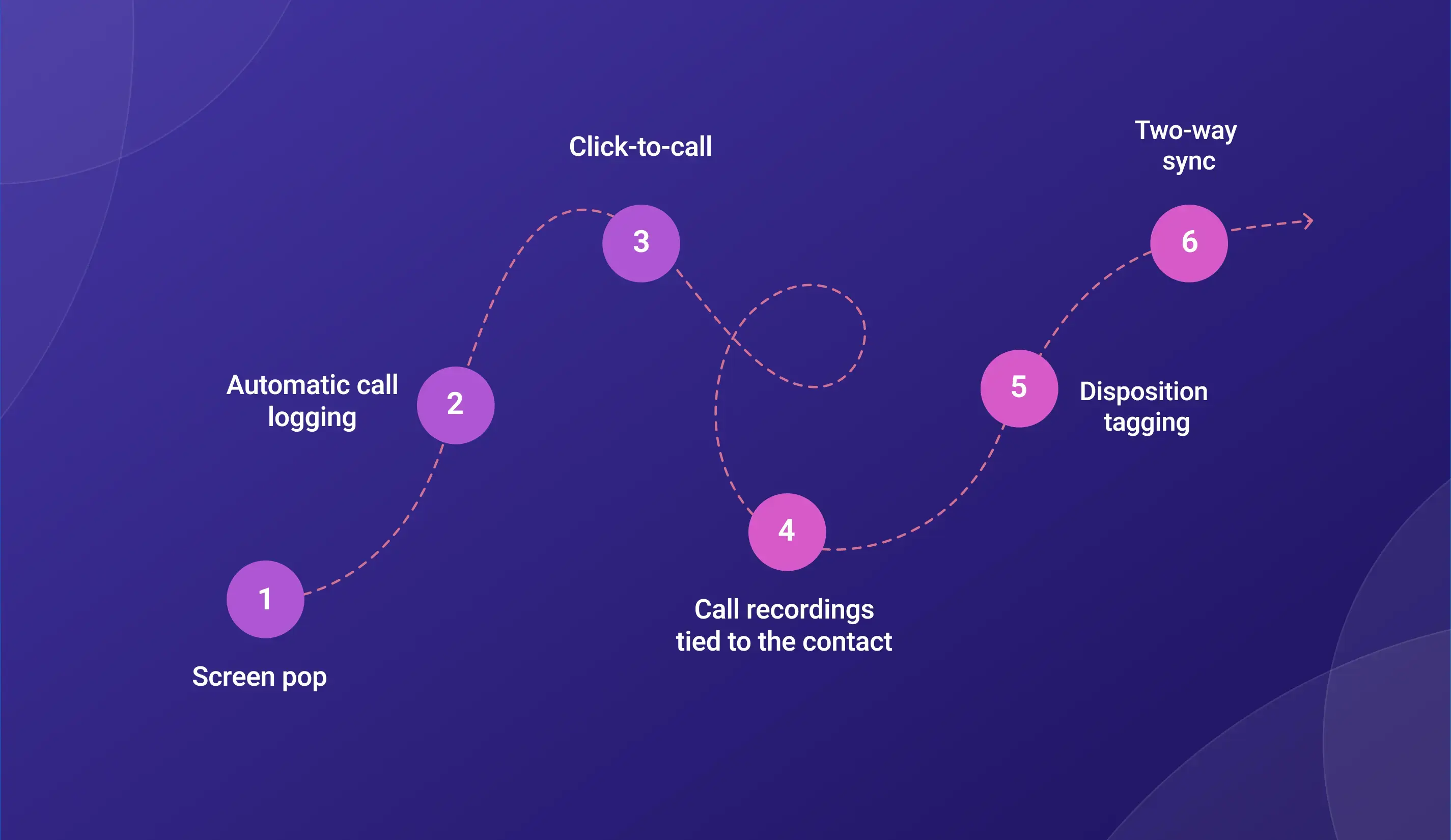
- Screen pop. The customer’s contact record opens the moment a call connects.
- Automatic call logging. Duration, outcome, and the recording of the call link to the CRM the instant the call ends.
- Click-to-call. Reps dial straight from the CRM record. No tab-switching, no re-typing numbers.
- Call recordings tied to the contact. Recordings live against the relevant contact or deal, not buried in a separate dashboard.
- Disposition tagging. How a call gets tagged can trigger the next step in a CRM workflow automatically.
- Two-way sync. Update a contact in the CRM and TeleCMI reflects it. Update it in TeleCMI and the CRM catches up too.
Top CRM Platforms with TeleCMI Pre-Built Integrations
Zoho
Best for: Indian SMBs, IT services, and mid-market businesses
Zoho CRM takes the near the top of the list for a reason. It’s one of the most widely adopted platforms across Indian sales, support, and operations teams, and it packs in strong automation and multichannel support without the enterprise price tag.
Click-to-call works the moment Zoho connects to TeleCMI. Call duration and outcome updates are automatically available on the activity timeline, and recordings are attached to the contact or deal for easy playback later. Inbound calls trigger a screen pop before the agent even picks up, and disposition tags can trigger Zoho workflows such as deal stage updates, task creation, or follow-up emails.
Teams that run their pipeline through Zoho or handle support tickets through Zoho Desk get the most out of this pairing. One thing worth knowing up front is that teams with heavily customized Zoho fields should confirm mapping compatibility before rollout, since custom fields sometimes require a brief setup pass.

HubSpot
Best for: Startups, SaaS companies, and marketing-led sales teams
HubSpot CRM has become the default choice of CRM for growing companies, largely because of how well it links marketing, sales, and service data in one place.
TeleCMI works right inside HubSpot. Agents can call a contact, company, or deal with just one click, no extra steps needed.
Every call gets logged automatically on the HubSpot timeline. When a call comes in, the rep can see the contact's full history right away. That means walking into every conversation already prepared, not starting from scratch.
Call recordings save directly to the contact record, making it easy to review calls and coach the team. Based on how a call ends, HubSpot can also take the next step on its own: move the deal forward, create a follow-up task, or add the contact to a sequence.
This setup fits especially well for inbound sales teams running HubSpot sequences, and for marketing teams that want to see how call activity connects to the rest of the funnel.
Salesforce
Best for: Enterprises and large sales organizations
Salesforce remains the enterprise standard CRM. It handles complex pipelines, deep account hierarchies, and layered automation better than most alternatives.
TeleCMI’s Salesforce integration brings click-to-call into leads, contacts, accounts, and opportunities. Every call logs against the correct Salesforce record, with the outcome and duration attached, and recordings are saved as attachments directly on that record. Inbound screen pop automatically matches callers against the Salesforce database, and custom field mapping means TeleCMI call data can feed straight into existing Salesforce reporting. Disposition tags can even trigger Salesforce flows and Process Builder automations.
This pairing works best for enterprise sales teams running complex Salesforce configurations, and account management teams managing large, multi-touch portfolios.
LeadSquared
Best for: EdTech, healthcare, financial services, and high-volume lead management
LeadSquared CRM has a strong footprint in India’s EdTech, healthcare, and BFSI sectors, largely thanks to its strong performance in high-volume lead management and outbound campaign automation.
Connected to TeleCMI, reps can click to call straight from LeadSquared lead records, and call outcomes automatically sync to the activity log. Inbound caller pop matches against the LeadSquared lead database, and call dispositions can trigger automation rules like lead stage changes or drip sequence enrollment. Recordings attach to the lead record for easy reference during follow-up.
Admission teams in EdTech, insurance and banking sales teams, and healthcare patient acquisition teams that run high outbound volume tend to get the most value from this pairing.
Freshdesk
Best for: Support-first teams managing high ticket volume
Freshdesk CRM is built for support, and TeleCMI fits right into that.
When a call comes in, TeleCMI can automatically create or update a support ticket for that caller. So the agent sees the full ticket history the moment they answer, no digging around needed.
Call recordings save directly to the ticket, which comes in handy for resolving disputes or checking how an issue was handled. Agents can also click to call right from the ticket view. And depending on how the call goes, the ticket status can update on its own or trigger an escalation.
Customer support teams' phone alongside email and chat channels get the clearest benefit here, since every channel starts to live on the same timeline. If you're still deciding on a help desk, it's worth comparing a few Freshdesk competitors before settling on your stack.
Sell.Do
Best for: Real estate teams managing high lead volume
Sell.Do is built for real estate sales, so speed and lead tracking matter a lot here.
Agents can click to call straight from a lead record, and every call logs automatically. There's no need to jump between the dialer and the CRM screen.
Once a call ends, TeleCMI can move the lead to its next stage on its own, based on how the conversation went. That keeps the pipeline moving without someone manually updating every record.
Real estate teams handling a high volume of site visits and callbacks get the most out of this, since nothing slips through the cracks.
Meritto
Best for: Higher-ed admissions and enrollment teams
Meritto is built for higher-ed lead management, where follow-ups need to happen fast and on schedule.
Click-to-call works the same way here, straight from the lead or applicant record. Calls log automatically, so counselors always have the full history in front of them.
Based on the call outcome, TeleCMI can trigger the next step in the admissions process, whether that's a follow-up call or moving the applicant forward.
Admissions teams managing large batches of leads during peak enrollment season benefit the most from this setup.
Kapture
Best for: Support-heavy teams handling repeat customer issues
Kapture leans heavily on support, so ticket and case history really matter here.
The Calls log directly against the customer record, and agents can see past interactions before they even pick up. That means less time spent asking the customer to repeat themselves.
Recordings attach to the case too, which helps when reviewing how an issue was resolved or handled.
Teams dealing with repeat customer issues or longer support cycles get the biggest boost from this.
Pabbly
Best for: Smaller outbound teams that want to keep things light
Pabbly CRM is built for smaller teams, so the setup stays light on purpose.
Click-to-call and automatic call logging work the same way as everywhere else, minus the extra complexity larger teams often don't need.
It's a good fit for teams that want calling built into their workflow without a heavy setup process.
Neodove
Best for: Small outbound sales teams focused on volume
Neodove CRM is also built with smaller outbound teams in mind.
The idea here is to keep things simple: call, log it, and move to the next lead. No extra steps in between.
That makes it a solid fit for teams focused on getting through call lists quickly and efficiently.
Rsoft
Best for: Regional businesses with localized workflows
Rsoft CRM serves regional business needs, and the integration is built to match.
Click-to-call and automatic logging work the same way, adapted to fit how regional teams already operate day to day.
Practices that don't want to worry with a complicated setup will like this. It just works: calls happen, get logged, and patient records stay current.
Clinicia
Best for: Healthcare practices managing patient calls
Clinicia is built for healthcare practice management, so patient records naturally take center stage.
When a call comes in or goes out, it is logged directly in the patient's record. No manual entry, no switching between systems mid-call.
That makes follow-ups smoother and keeps care coordination on track, since the front desk and the care team are always looking at the same information.
Practices juggling a steady stream of patient calls and appointment reminders will notice the difference most here.
ExtraedgeCRM
Best for: Education-sector teams managing student outreach
ExtraedgeCRM is built with education-sector teams in mind.
Calls log automatically against student or lead records, so counselors and admissions staff always have the same information in front of them.
That keeps everyone on the same page, especially during busy outreach periods.
Kylas
Best for: SMB sales teams that want one lean setup
Kylas CRM works well for SMB sales teams who want calling and CRM in one place.
Click-to-call, automatic logging, and disposition-based automation all work right out of the box, no extra setup needed.
It's a solid fit for smaller sales teams that want a lean, no-fuss tool.
Godial
Best for: Lean SMB sales teams
Godial is another good option for SMB sales teams that want to keep things simple.
Agents call directly from the record, calls log automatically, and dispositions handle what happens next.
It fits teams that want calling and CRM working together without extra complexity.
Rednote
Best for: Niche business use cases
Rednote covers more specific business needs, with the same dependable pattern behind it.
Call, log, and let the next step happen automatically. Simple and consistent, no matter the use case.
AutomateCRM
Best for: Teams that want calling and automation without a heavy setup
AutomateCRM keeps things flexible for teams that need calling and automation, minus the complexity.
Click-to-call and logging work the same reliable way as the rest of TeleCMI's integrations.
Purplecloud
Best for: Teams that want a dependable, built-in calling setup
Purplecloud brings the same core TeleCMI experience, built around whatever platform a team is already using day to day.
Agents can click to call directly from within Purplecloud, and every call logs automatically without anyone needing to update records by hand.
Based on how the call goes, TeleCMI can trigger the next step on its own, whether that's an automation, a task, or a status change, keeping the workflow moving without extra manual work.
CRM Comparison Table
How to Choose the Right CRM for Your TeleCMI Integration
The right pick usually comes down to three questions: what does the team already run on, how much automation does the workflow actually need, and how large is the operation today versus where it’s headed.
Pick Zoho CRM if the business is an SMB that needs strong automation but isn't ready for enterprise pricing, or if support already runs through Zoho Desk.
Go with Salesforce when the sales org needs deep customization, complex account hierarchies, or reporting that integrates with an existing enterprise data stack.
HubSpot is suitable if your marketing and sales share the pipeline, or the team relies on inbound sequences and wants call activity visible across the whole funnel.
For EdTech, healthcare, or financial services running high-volume outbound campaigns, LeadSquared is worth choosing since lead scoring and drip automation matter just as much as the call itself.
And if the real priority is keeping support tickets connected across phone, email, and chat rather than managing a sales pipeline, Freshdesk is the better fit.
Pre-Built Integration vs Custom API Integration
A pre-built integration is ready to configure and go live the same day. TeleCMI maintains the connector, so updates on either the CRM or TeleCMI side get handled without breaking the sync. A custom API integration makes sense when a business runs a CRM outside the pre-built list, or needs a workflow specific enough that no standard connector covers it. It takes longer to set up and typically needs developer time, but it opens the door to fully custom field mapping and logic.
Most teams start with a pre-built integration and only move to custom API work when a genuinely unique requirement calls for it.
Setting Up a TeleCMI CRM Integration and What to Expect
Setup for most TeleCMI CRM integrations is self-serve, and no developer is needed for standard configurations. From the TeleCMI dashboard, the whole process typically takes under an hour.
Setup covers a few things like field mapping, screen pop rules, how calls are logged, disposition tags, and whatever workflow triggers the team wants to run from day one.
Before going live, it's worth doing a quick test run. Place a test call, check that the screen pop appears, ensure the call log lands in the CRM, and confirm that the recording link opens.
Conclusion
TeleCMI CRM integration doesn't need a big learning curve its a simple process. Call logs on their own. Recordings land where the team already checks. Follow-ups get created without someone having to remember to do it. Different teams need different setups. HubSpot works for sales, Freshdesk for support, and Sell.Do or Meritto for teams chasing leads and deadlines. None of these are wrong choices. The point is to pick the CRM setup that matches how the team already works, rather than forcing the team to adjust to the tool.
Ready to Automate Your CRM Calling Workflow with TeleCMI?

Click-to-Call from CRM
Automatic Call Logging
Call Recordings & Screen Pop
Automated Follow-Ups
Frequently asked questions (FAQ)
Vignesh N

With deep expertise in cloud telecommunications, I help readers explore the latest trends in VoIP and modern business communication. At TeleCMI, I focus on educating businesses with clear, practical insights, making complex telecom concepts easy to understand. I’m passionate about helping organizations improve efficiency, enhance customer engagement, and adopt smarter communication strategies.


.webp)
.webp)



